How to film your tennis strokes for video analysis: angle, distance, light and length
Phone to the side and steady, the whole player in frame, normal speed and one stroke per video: the practical rules for a recording the analysis can measure, and the reasons a video gets rejected.
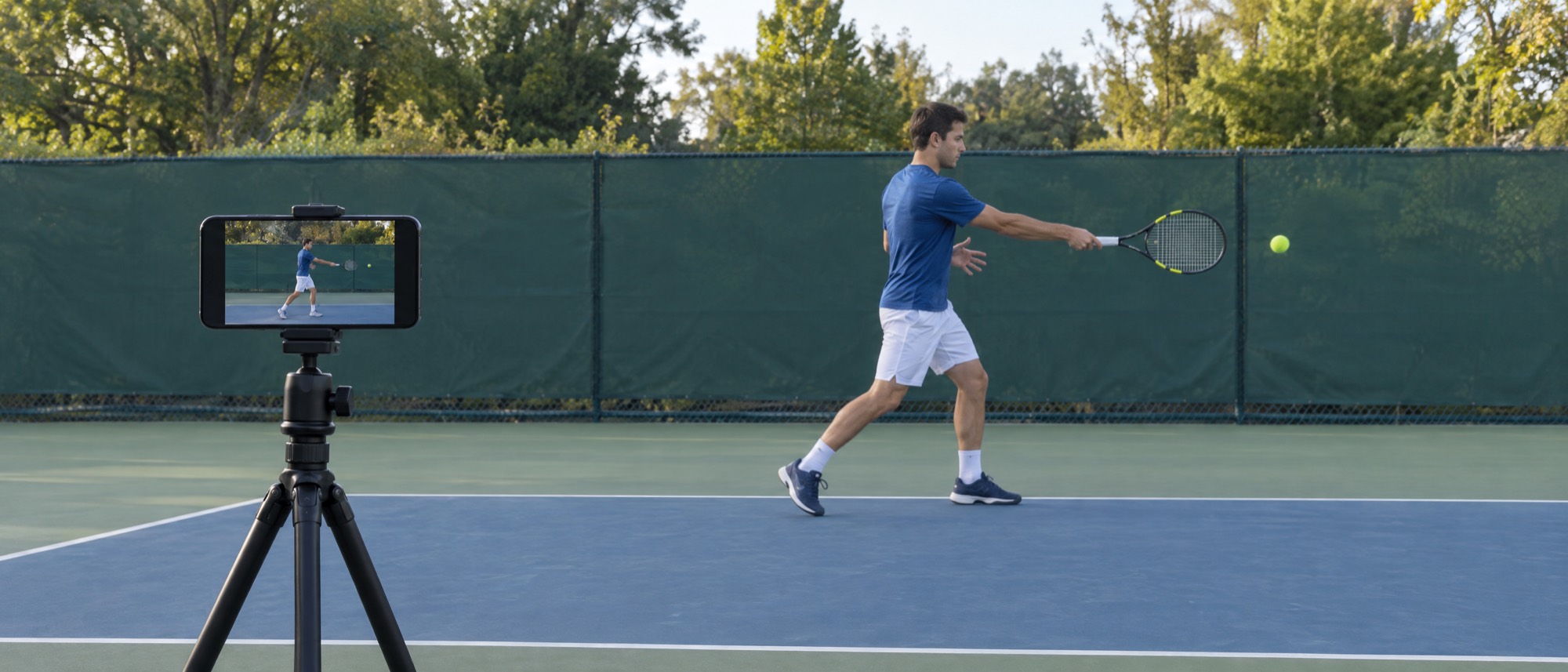
To analyze a stroke, artificial intelligence rebuilds the position of the head, shoulders, elbows, wrists, hips, knees and ankles in every frame of the video, and from there measures the angles and timing of the movement. If the body is too small, hidden, filmed from the wrong angle or shaky, those measurements can't be made and the video has to be redone.
It happens to 12% of the videos uploaded to the app (497 out of 4,147, from November 2025 to November 2026). Among the most recent rejections, the only ones with the reason recorded (126), 41% were because the player was too far from the camera, 25% because the stroke was filmed from the front, 14% because the camera was moving, 13% because the player was hard to see and 7% because the stroke was filmed from behind. The other numbers are in the report on TennisIA's analyses.
The tips in this guide are the same rules TennisIA uses to decide whether a video can be analyzed: follow them and you'll keep the risk of having to redo it to a minimum. They also help if you review the video with your coach: a steady, well-lit side view shows the stroke far better than one filmed from the stands.
Film from the side, never from the front or behind
The analysis measures the angles of the legs, trunk and arms during the stroke, and seeing them takes the body's profile. Place the phone beside the player, or at a slight diagonal.
From the front or from behind the body looks flattened: arms and legs overlap and many angles can't be measured. The app recognizes these recordings and rejects them, asking you to film the video again from the side: among rejections with the reason recorded, filming from the front is the second most common.
The serve needs a full side view. For forehand and backhand a slightly angled camera is fine too; for the backhand, put the phone on the side opposite the arm the player holds the racket with. Before you upload, the app shows an example video with the right setup.
Distance and framing: the whole player, and big
The player must stay fully in frame, from head to feet, for the whole stroke, and be big enough for every joint to be made out.
A distance of 3-5 meters usually works: the player must take up at least a quarter of the frame's height. If they are smaller, the app rejects the video with the reason “You were too far from the camera”. Among rejections with the reason recorded, it's the most common.
Set the phone at about waist height and leave some room around the player: during the stroke the arm and racket swing wide, and a head or foot cut out of the frame takes reference points away from the analysis. Portrait and landscape both work.
Keep the phone still, don't follow the stroke
If the frame moves, the analysis can't tell the player's movement from the camera's.
Set the phone on a tripod or on something stable, like a bag or a bench, and let the stroke come into the frame without following it. If the camera moves too much, the app rejects the video with the reason “The camera was moving”.
You don't need an expensive tripod: what matters is that the phone stays still. A handheld recording, even by a careful friend, risks moving enough to need redoing.
Good light and no one in the way
The player must be recognizable in every frame: you need good light and nothing between the phone and the court.
Avoid backlighting, meaning the sun or floodlights behind the player, and areas of deep shadow: the body should be clearly visible, not a dark silhouette.
Make sure no one walks past or stands in the foreground between the phone and the player. If the app can't recognize the player, the video is rejected with the reason “We can't see the player clearly”.
Normal speed and a single stroke
The analysis also measures the timing of the movement, which is why it needs a video at normal speed with a single stroke.
Turn off slow motion in your camera: a slowed-down video distorts the timing of the movement and the app may reject it. Otherwise your phone's normal video quality is fine, with no special settings.
Each video must contain a single stroke. After you record it or pick it from your gallery, the app has you trim the part you need: up to 4 seconds for forehand and backhand and 8 for the serve, which is a longer movement.


Pick the right stroke and upload
Before uploading, select in the app the stroke you filmed: forehand, backhand or serve.
If you upload a serve as a groundstroke, or the other way round, the app notices and asks you to upload the same video again with the right stroke. If you're left-handed you don't need to set anything: the analysis works out by itself which hand you play with.
If the video can't be analyzed, the app explains why and how to redo it, and the analysis is refunded. If instead there was a technical problem unrelated to the video, you can upload the same video again.
From the side, at the right distance, with the phone steady, good light, normal speed and a single stroke: with these rules your video is ready for analysis. Download TennisIA, film your forehand, backhand or serve, and in about 2 minutes you'll get a score from 0 to 100, with a rating for each phase of the stroke and pointers on what to fix.
FAQ
Which side should I put the phone on to film a tennis stroke?+
Beside the player, or at a slight diagonal: measuring the body's angles takes its profile. The serve needs a full side view; for the backhand, put the phone on the side opposite the arm the player holds the racket with. Never from the front or from behind: the app rejects those recordings.
How long should the video be?+
A few seconds, with a single stroke. After recording, the app has you trim the video: up to 4 seconds for forehand and backhand and 8 for the serve.
Should I film in portrait or landscape?+
Both work. What matters is that the player stays fully in frame for the whole stroke, from head to feet, and takes up at least a quarter of its height.
Do I need a tripod?+
You need the phone to stay still. A tripod is the easiest option, but resting it on a bag or a bench works too. Avoid holding it in your hand or following the stroke: a moving camera is one of the reasons a video gets rejected.
Can I use slow motion?+
No. The analysis also measures the timing of the movement, and a slowed-down video distorts it: record at normal speed, with your phone's standard video quality.
Why was my video rejected?+
Because the recording didn't allow the movement to be measured: the player too far away, a moving camera, the stroke filmed from the front or from behind, a slow-motion video, the player hard to see, or a serve uploaded as a groundstroke or vice versa. In the app's data the most common are the player being too far from the camera (41% of rejections with the reason recorded) and filming from the front (25%). The app tells you the reason and how to redo the video, and the analysis is refunded.
Does the analysis work for left-handers too?+
Yes. You don't need to set anything: the analysis works out by itself which hand you play with, and the filming rules are the same.
One technique guide a week, straight to your inbox.
No spam, just analysis and data.


